TABLE OF CONTENTS
- Why am I being charged sales tax?
- Which states are currently charged tax?
- What about orders shipping to other states?
- Does non-profit or 501(c)(3) status automatically exempt my organization from sales tax?
- What if I want my organization's tax exemption to apply going forward?
- How do I apply tax exemption to my order?
- Can tax be removed from an order after it's placed?
- Still need help?
Why am I being charged sales tax?
Recent changes in e-commerce tax legislation, stemming from the South Dakota v. Wayfair Supreme Court decision, introduced a concept called "Nexus." Nexus determines when a business is required to collect sales tax in a given state. You can learn more about how Nexus works here.
Because Nexus thresholds can change over time, the list of taxed states below may not always be fully up to date. For the most current information, please contact our team at sales@rockstarpasses.com.
Which states are currently charged tax?
As of publication, we have reached the Nexus threshold in the following states and are required to collect sales tax on orders shipped there:
- Arkansas
- Florida
- Georgia
- Illinois
- Indiana
- Nevada
- North Carolina
- Pennsylvania
- Tennessee
- Virginia
What about orders shipping to other states?
Orders shipping outside the states listed above are exempt from taxation until we reach the Nexus threshold in that state. No additional paperwork is needed for these orders to remain tax-exempt, you may simply place your order by following these steps.
Does non-profit or 501(c)(3) status automatically exempt my organization from sales tax?
No. Federal tax-exempt status does not automatically extend to state sales & use tax. Not every non-profit, church, or 501(c)(3) organization qualifies for sales tax exemption in a given state. This is determined by state law, not by us.
If your tax exemption paperwork does not specifically cover Sales & Use tax exemption for resale or personal purchase, your order will still be subject to taxation.
What if I want my organization's tax exemption to apply going forward?
If you'd like us to consider your organization for tax exemption, please submit your documentation before placing your order. You are legally responsible for paying tax on any orders placed prior to your documentation being on file with us.
How do I apply tax exemption to my order?
If your company is already registered as tax-exempt in our system:
- Click the "I am requesting Tax Exempt status for this order" button at checkout.
- Make sure the Company field in your shipping address matches your tax-exempt documentation exactly — this is what we use to match your order to our records.
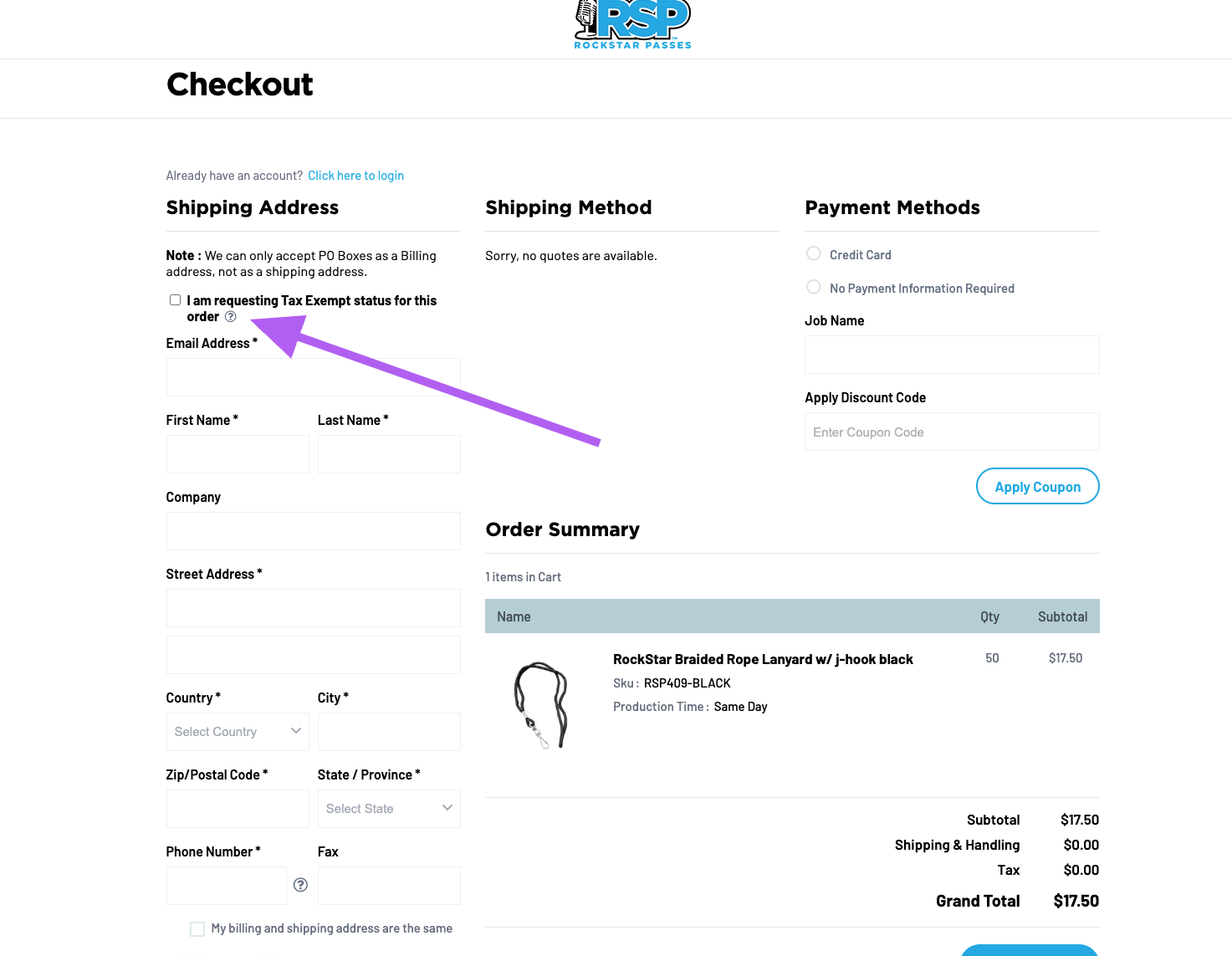
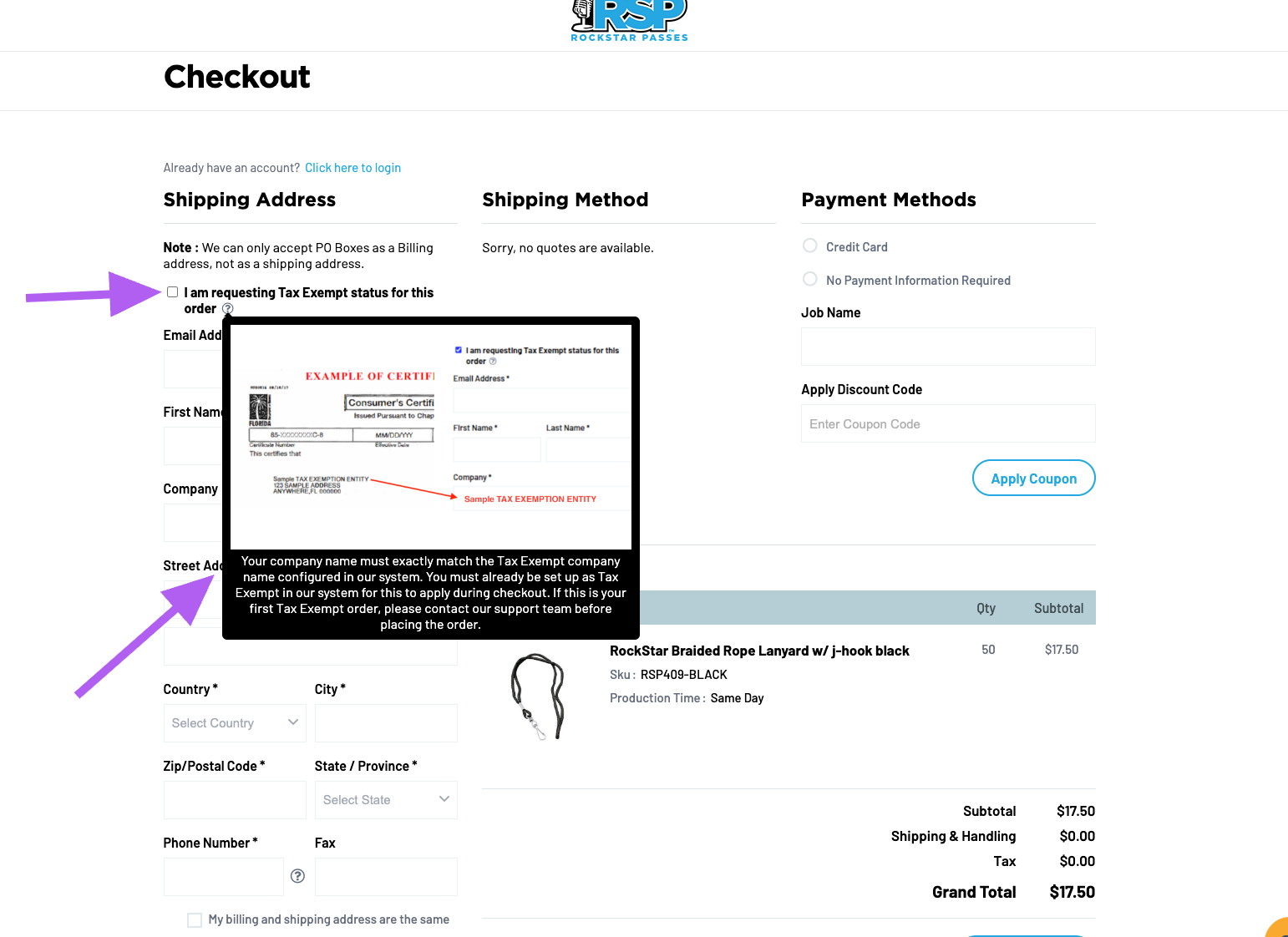
If your information matches what we have on file, the tax will automatically be removed from your order total before you check out.
Can tax be removed from an order after it's placed?
No. Once an order is placed, we are legally unable to remove tax from it retroactively and therefore cannot do so on our end technologically. If your order is taxed, you will need to:
- Pay the tax at checkout, then
- Apply for a refund of that tax directly from your state.
Any orders placed after your exemption documentation is on file with us will be tax-exempt going forward.
If you still need it, our customer support team is happy to help. Submit a support ticket here, and we'll get back to you as soon as possible.
Was this article helpful?
That’s Great!
Thank you for your feedback
Sorry! We couldn't be helpful
Thank you for your feedback
Feedback sent
We appreciate your effort and will try to fix the article